Introduction to PAM and basic usage
Description of document content
In this chapter, you will learn the following about PAM:
- Basic theoretical content
- Configuration file description
- Using PAM to enhance the security of the operating system
Prerequisites and Assumptions:
- A noncritical Rocky Linux PC, server, or VM
- Root access
- Some existing Linux knowledge
- A desire to learn about user and app authentication on Linux
- The ability to accept the consequences of your own actions
Introduction
PAM (Pluggable Authentication Modules) is the system under GNU/Linux that allows many applications or services to authenticate users in a centralized fashion. PAM was initially proposed by Vipin Samar and Charlie Lai of Sun Microsystems (later acquired by Oracle) in 1995 and implemented on their Solaris system. Later, various UNIX variants and GNU/Linux distributions also added support for it. The original intention of PAM's design was to integrate different underlying authentication mechanisms into a high-level API, saving developers the trouble of designing and implementing various complex authentication mechanisms themselves. In 1997, the Open Group published the X/Open Single Sign-on (XSSO) preliminary specification, which standardized the PAM API and added extensions for single (or rather integrated) sign-on.
PAM is open source. You can find more information on the GitHub site here.
- How to ensure that the users of the applications, services, or tools used in the system are always themselves?
- How to specify time periods for system users to restrict access to services?
- How to limit the usage of system resources by various applications or services?
Without PAM, you can only write authentication functions in various applications. Once you need to modify a specific authentication method, developers might have to rewrite the program, recompile it, and reinstall it. Using PAM, the application's identity authentication is handled, so the program subject can no longer focus on identity authentication itself.
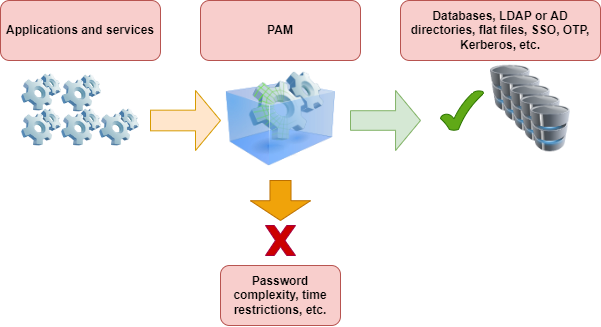
PAM is primarily composed of shared libraries (.so files) and configuration files. Its main characteristics are as follows:
- Based on a modular design and with insertable functionality
- The authentication method is independent of the application
- Provides developers with a unified API
- High flexibility, allowing applications to freely choose the required authentication method through PAM
- Enhance operating system security
Terms in PAM
In the early days of PAM, Vipin Samar and Charlie Lai did not formally define these terms. Still, they used terms that were not formally defined, which led to misleading or incomprehensible situations when used. In 1999, Andrew G. Morgan (author of Linux-PAM) established consistent, clear terminology for the first time in his white paper, though it was not yet perfect.
FreeBSD documentation provides explanations of the following terms:
- account - The set of credentials the applicant is requesting from the arbitrator.
- applicant - The user or entity requesting authentication.
- arbitrator - The user or entity who has the privileges necessary to verify the applicant’s credentials and the authority to grant or deny the request.
- chain - The system invokes a sequence of modules when responding to a PAM request. The chain includes information about the order in which to invoke the modules, what arguments to pass to them, and how to interpret the results.
- client - The application is responsible for initiating an authentication request on the applicant's behalf and obtaining the necessary authentication information from them.
- facility - One of the four basic groups of functionality provided by PAM: authentication, account management, session management, and authentication token update.
- module - A collection of one or more related functions implementing a particular authentication facility, gathered into a single (normally dynamically loadable) binary file and identified by a single name.
- policy - The complete set of configuration statements describing how to handle PAM requests for a particular service. A policy normally consists of four chains, one for each facility, though some services do not use all four facilities.
- server - The application acts on behalf of the arbitrator to converse with the client, retrieve authentication information, verify the applicant’s credentials, and grant or deny requests.
- service - A class of servers providing similar or related functionality and requiring similar authentication. PAM defines policies on a per-service basis, so all servers that claim the same service name are subject to the same policy.
- session - The context in which the service is rendered to the applicant by the server. One of PAM’s four facilities, session management, concerns itself exclusively with setting up and tearing down this context.
- token - A chunk of information associated with the account, such as a password or passphrase, which the applicant must provide to prove their identity.
- transaction - A sequence of requests from the same applicant to the same instance of the same server, beginning with authentication and session setup and ending with session tear-down.
Illustrating the terms with examples
Client and Server Are One:
Bash > whoami
alice

Bash > ls -l `which su`

Bash > su  -
Password: 1Q.3werzasd

Bash > whoami
root
- The applicant is alice
- The account is root
- The
suprocess is both client and server - The authentication token is 1Q.3werzasd
- The arbitrator is root
Client and Server Are Separate:
Bash > whoami
eve

Bash > ssh bob@login.example.com
bob@login.example.com's password:
god
Last login: Thu Oct 11 09:52:57 2024 from 192.168.0.1
- The applicant is eve
- The client is Eve’s
sshprocess - The server is the
sshdprocess on login.example.com - The account is bob
- The authentication token is god
- Although this is not shown in this example, the arbitrator is root
Example policy
sshd    auth        required    pam_nologin.so  no_warn
sshd    auth        required    pam_unix.so no_warn try_first_pass
sshd    account     required    pam_login_access.so
sshd    account     required    pam_unix.so
sshd    session     required    pam_lastlog.so  no_fail
sshd    password    required    pam_permit.so
- This policy applies to the
sshdservice - auth, account, session, and password are facilities
pam_nologin.so,pam_unix.so,pam_login_access.so,pam_lastlog.soandpam_permit.soare modules. From this example, you can see thatpam_unix.sohas at least implemented two functionality groups (authentication and account management)
PAM essentials
Facilities and Primitives
Primitive concepts in computer science: A process consisting of several instructions, used to accomplish a specific function. The system combines these instructions into a program that you cannot divide or interrupt during execution, ensuring the operation’s continuity and integrity. Hardware or operating systems typically provide primitives to implement critical system functions.
The PAM API provides six different authentication primitives, divided into four types of facilities:
- auth - Authentication. Authenticates the applicant and establishes the account credentials.
- account - Account management. Handles non-authentication-related account availability issues, such as time-of-day or server workload-based access restrictions.
- session - Session management. Handles tasks associated with session setup and tear down, including login and accounting.
- password - Password management. Changes the authentication token associated with an account, either because it has expired or because the user wishes to change it.
Different definitions
Some distributions define these 4 facilities as "module interfaces" or "module types".
Modules
A PAM module is a self-contained piece of program code that implements the primitives in one or more facilities for one particular mechanism. Simply put, the modules in PAM are collections of one or more related functions that implement specific authentication services.
Requesting the PAM module will return one of the following three states:
- success - Meet security policy
- failure - Not meeting security policy
- ignore - Request not involved in security policy
Chains and policies
When a server initiates a PAM transaction, the PAM library tries to load a policy for the service specified in the pam_start(3) call. The policy specifies how to process the authentication requests, as defined in a configuration file. This is the other central concept in PAM: the possibility for the admin to tune the system security policy (in the wider sense of the word) simply by editing a text file.
A policy consists of four chains, one for each of the four PAM facilities. Each chain is a sequence of configuration statements, each specifying a module to invoke, some (optional) parameters to pass to the module, and a control flag that describes how to interpret the return code from the module.
Control flags
These control flags include:
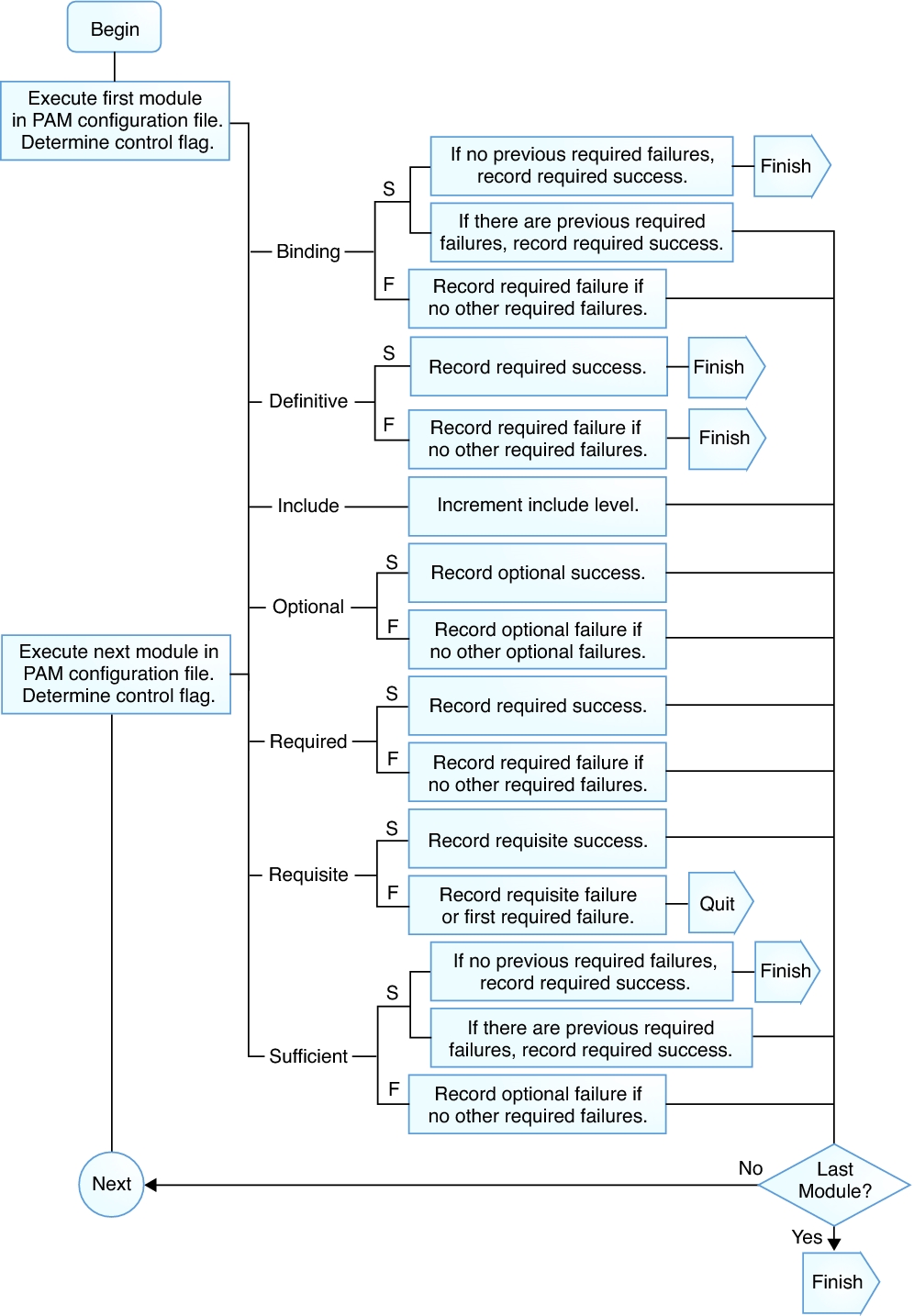
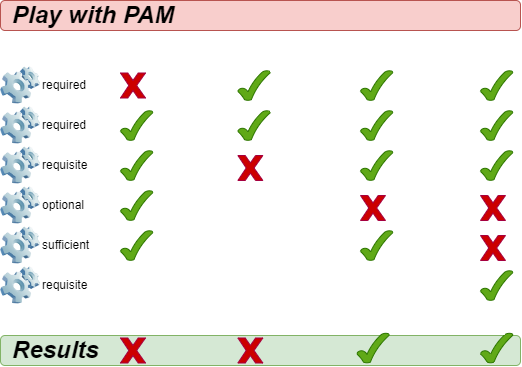
binding- If the module succeeds and no earlier module in the chain has failed, the chain terminates immediately, and grants the request. If the module fails, it executes the rest of the chain, but the request is deniedrequired- The module must succeed for authentication to continue. If the test fails at this point, the user is not notified until the results of all module tests that reference that interface are completerequisite- The module must succeed for authentication to continue. However, if a test fails at this point, the user receives notification immediately with a message reflecting the first failed "required" or "requisite" module testoptional- Ignores the module result. A module flagged as "optional" only becomes necessary for successful authentication when no other modules reference the interfacesufficient- Ignores the module result if it fails. However, if the result of a module flagged "sufficient" is successful and no previous modules flagged "required" have failed, then it requires no other results and authenticates the user to the serviceinclude- Unlike the other controls, this does not relate to the handling of the module result. This flag pulls in all lines in the configuration file that match the given parameter and appends them as an argument to the module
The following figure shows how to record the success or failure of each control flag:
For other control flags, please refer to man 5 pam.conf.
When a server invokes one of the six PAM primitives, PAM retrieves the chain for the facility the primitive belongs to, and invokes each of the modules listed in the chain, in their listed order, until it reaches the end, or determines that no further processing is necessary (either because a "binding" or "sufficient" module succeeded, or because a "requisite" module failed.) The system grants the request if and only if it invokes at least one module and all non-optional modules succeed.
tip
Note that it is possible, though not very common, to have the same module listed several times in the same chain. For instance, a module that looks up user names and passwords in a directory server could be invoked multiple times, each with different parameters specifying a different directory server to contact. PAM treats different positions of the same module within the same chain as distinct, unrelated modules.
Configuration file description
In the traditional old version of PAM, the configuration file was /etc/pam.conf. Currently, most distributions have abandoned this configuration file. This file contains all the policies related to identity authentication for the operating system. Each line represents a configuration statement in a certain chain of a certain service, and its syntax is as follows:
login auth required pam_nologin.so no_warn
The fields are, in order: service name, facility name, control flag, module name, and module arguments. The interpretation of any additional fields is as additional module arguments.
A policy consists of four chains, one for each of the four PAM facilities. Each chain is a sequence of configuration statements, each specifying a module to invoke, some (optional) parameters to pass to the module, and a control flag that describes how to interpret the return code from the module. A policy normally consists of four chains, one for each facility, though some services do not use all four facilities.
OpenPAM and Linux-PAM support another configuration mechanism: centralizing policy files in /etc/pam.d/ directory. In this case, PAM uses the service name as the file name to represent the policy file for that service.
Bash > ls -l /etc/pam.d/
total 88
-rw-r--r--. 1 root root 232 Nov 27 03:04 config-util
-rw-r--r--. 1 root root 322 Nov 30  2023 crond
-rw-r--r--. 1 root root 701 Nov 27 03:04 fingerprint-auth
-rw-r--r--. 1 root root 715 Feb  9  2024 login
-rw-r--r--. 1 root root 154 Nov 27 03:04 other
-rw-r--r--. 1 root root 168 Apr 20  2022 passwd
-rw-r--r--. 1 root root 760 Nov 27 03:04 password-auth
-rw-r--r--  1 root root 155 May 28  2024 polkit-1
-rw-r--r--. 1 root root 398 Nov 27 03:04 postlogin
-rw-r--r--. 1 root root 640 Feb  9  2024 remote
-rw-r--r--. 1 root root 143 Feb  9  2024 runuser
-rw-r--r--. 1 root root 138 Feb  9  2024 runuser-l
-rw-r--r--  1 root root 153 Nov 27 03:04 smartcard-auth
-rw-r--r--. 1 root root 727 Aug 14 04:36 sshd
-rw-r--r--. 1 root root 214 Dec 18 01:38 sssd-shadowutils
-rw-r--r--. 1 root root 566 Feb  9  2024 su
-rw-r--r--. 1 root root 154 Feb 15  2024 sudo
-rw-r--r--. 1 root root 178 Feb 15  2024 sudo-i
-rw-r--r--. 1 root root 137 Feb  9  2024 su-l
-rw-r--r--. 1 root root 760 Nov 27 03:04 system-auth
-rw-r--r--  1 root root 368 Dec 18 01:56 systemd-user
-rw-r--r--. 1 root root  84 Jun 22  2023 vlock
Bash > grep -v ^# /etc/pam.d/sshd
auth       substack     password-auth
auth       include      postlogin
account    required     pam_sepermit.so
account    required     pam_nologin.so
account    include      password-auth
password   include      password-auth
session    required     pam_selinux.so close
session    required     pam_loginuid.so
session    required     pam_selinux.so open env_params
session    required     pam_namespace.so
session    optional     pam_keyinit.so force revoke
session    optional     pam_motd.so
session    include      password-auth
session    include      postlogin
The content of each policy file can consist of up to four fields:
- TYPE - One of auth, session, password, or account
- CONTROL - Control flag
- MOUDLE_PATH - Module paths and modules ending in .so. For 64-bit operating systems. You can find all modules in /lib64/security/
- MOUDLE_ARGS - Module arguments control module behavior. optional
In the /etc/security/ directory, there are global configuration files for PAM modules that define their exact behavior. Each application that uses the PAM module calls a set of PAM functions, which then process the information in the configuration file and return the results to the requesting application.
Since the determination of PAM's policy is by file name rather than specified in the content of the policy file, you can use the same policy file for multiple services with different names. For example:
Bash > cd /etc/pam.d/ && ln -s sudo ftp
Explanation of the content of the policy file
Bash > cat /etc/pam.d/system-auth
#%PAM-1.0
# This file is auto-generated.
# User changes will be destroyed the next time authselect is run.
auth        required      pam_env.so
auth        sufficient    pam_unix.so try_first_pass nullok
auth        required      pam_deny.so

account     required      pam_unix.so

password    requisite     pam_pwquality.so try_first_pass local_users_only retry=3 authtok_type=
password    sufficient    pam_unix.so try_first_pass use_authtok nullok sha512 shadow
password    required      pam_deny.so

session     optional      pam_keyinit.so revoke
session     required      pam_limits.so
-session     optional      pam_systemd.so
session     [success=1 default=ignore] pam_succeed_if.so service in crond quiet use_uid
session     required      pam_unix.so

Bash > cat /etc/pam.d/login
#%PAM-1.0
auth       substack     system-auth
auth       include      postlogin
account    required     pam_nologin.so
account    include      system-auth
password   include      system-auth
# pam_selinux.so close should be the first session rule
session    required     pam_selinux.so close
session    required     pam_loginuid.so
session    optional     pam_console.so
# pam_selinux.so open should only be followed by sessions to be executed in the user context
session    required     pam_selinux.so open
session    required     pam_namespace.so
session    optional     pam_keyinit.so force revoke
session    include      system-auth
session    include      postlogin
-session   optional     pam_ck_connector.so
Content description:
#%PAM-1.0- Declaring the version of this configuration file for PAM1.0 is a habit that you can use to check versions in the future. Similar to the "#!/bin/bash" in bash scripts.# This file is auto-generated.- Lines starting with#represent comment lines.-session- The prefix "-" indicates that even if the module does not exist, it will not affect the authentication result, let alone record this event in the log. This feature is very useful for optional modules.include- Special control flag.substack- Special control flag. There is a slight difference from the "include" control flag. For example, a "requisite" failure in the sub-stack will only cause the sub-stack to terminate and return the failure result, without immediately terminating the parent stack. In PAM, "stack" refers to the execution steps and rules, and a sub-stack refers to another stack nested within a stack (the parent stack).-
From the content, you can see that the writing style of control flags cannot only use keywords (called "keyword" mode), but also have a [value1=action1 value2=action2 ... ] style, which calls the return code of the function in the line module.
- "value" can have: success, open_err, symbol_err, service_err, system_err, buf_err, perm_denied, auth_err, cred_insufficient, authinfo_unavail, user_unknown, maxtries, new_authtok_reqd, acct_expired, session_err, cred_unavail, cred_expired, cred_err, no_module_data, conv_err, authtok_err, authtok_recover_err, authtok_lock_busy, authtok_disable_aging, try_again, ignore, abort, authtok_expired, module_unknown, bad_item, conv_again, incomplete, and default.
- "action" can be one of them: ignore, bad, die, ok, done, N (N must be a positive integer greater than 0. If it is equal to 0, it is equivalent to OK), reset
pam_unix.so- Module path and module name. The path here refers to /lib64/security/ relative path.use_authtok nullok sha512 shadow- Optional module arguments passed to the module. To view all optional parameters for a specific module, enterman 8 Module-Name, for exampleman 8 pam_unix.
system-auth
system-auth is a very important PAM policy file, mainly responsible for authenticating user login to the system. Not only that, other programs or services can call it using the include keyword, saving time reconfiguring. When you are unsure how to configure, you should first search for the relevant information or consult relevant technical personnel.
Bash > cat /etc/pam.d/system-auth
#%PAM-1.0
# This file is auto-generated.
# User changes will be destroyed the next time authselect is run.
auth        required      pam_env.so
auth        sufficient    pam_unix.so try_first_pass nullok
auth        required      pam_deny.so

account     required      pam_unix.so

password    requisite     pam_pwquality.so try_first_pass local_users_only retry=3 authtok_type=
password    sufficient    pam_unix.so try_first_pass use_authtok nullok sha512 shadow
password    required      pam_deny.so

session     optional      pam_keyinit.so revoke
session     required      pam_limits.so
-session     optional      pam_systemd.so
session     [success=1 default=ignore] pam_succeed_if.so service in crond quiet use_uid
session     required      pam_unix.so
As you can see, this policy file uses a complete set of 4 chains, each corresponding to a facility, and you can stack each facility (i.e., the same facility can write multiple lines, and each line can call the same or different modules). Emphasize again:
PAM considers different positions of the same module appearing in the same chain as distinct and unrelated modules.
auth chain
When a user logs in, their identity and password will be verified through auth.
- pam_env.so - Defines environment variables after user login. By default, if no configuration file exists, environment variable settings are in the /etc/security/pam_env.conf file.
- pam_unix.so - Uses this module to prompt the user to enter their password and compare it with the password information recorded in /etc/shadow. The user can log in if the password comparison succeeds. Using the "sufficient " control flag means that, provided verification of this configuration item passes, the user can fully authenticate without requesting other modules. The nullok module parameter indicates whether null passwords are allowed.
- pam_deny.so - Directly rejects all login requests that do not meet any of the above conditions through the pam_deny.so module. pam_deny.so is a special module that always returns "no". As with most security mechanisms, requests that do not match the authentication rules are rejected after all authentication rules are completed.
account chain
- pam_unix.so - Indicates that the user needs to pass password verification.
password chain
-
pam_pwquality.so - Uses only in the password facility. Check the complexity of passwords, with commonly used module parameters as follows:
- debug - Enable this parameter to write the behavior information of the module to syslog
- authtok_type=XXX - The default action is for the module to use the following prompts when requesting passwords: "New UNIX password: " and "Retype UNIX password: ". You can replace the example word "UNIX" with this option. It is empty by default.
- try_first_pass - Indicates that the module should first use the password obtained from the previous module, and if the password verification fails, prompt the user to enter a new password.
- local_users_only - Indicates to ignore users who are not present in the local /etc/passwd file.
- retry=N - The number of password retries allowed after changing the password; the default value is 1.
- minlen=N - What is the minimum length for a new password? The default value is 8.
- difok=N - What is the minimum number of characters that must differ between the new and old passwords? The default value is 1. The special value of 0 disables all checks of similarity of the new password with the old password, except that the new password is exactly the same as the old one.
- dcredit=N - When N>0, it indicates the maximum number of allowed numeric characters in the new password. When N<0, this indicates that the minimum number of numeric characters required for the new password is 0. When N=0, it means the new password can contain any number of numeric characters.
- lcredit=N - When N>0, it indicates the maximum number of lowercase letters allowed in the new password. When N<0, this indicates that the minimum number of lowercase letters you must include in the new password is 0. When N=0, this indicates that there is no limit on the number of lowercase letters in the new password.
- ucredit=N - When N>0, it indicates the maximum number of uppercase letters allowed in the new password. When N<0, this indicates the minimum number of uppercase letters you must include in the new password. When N=0, this indicates that there is no limit on the number of uppercase letters in the new password.
- ocredit=N - When N>0, it indicates the maximum number of special characters allowed in the new password. When N<0, it indicates that the minimum number of special characters required in the new password is 0. When N=0, this indicates that there is no limit on the number of special characters in the new password.
- maxrepeat=N - Reject passwords containing N or more identical consecutive characters. The default value is 0, which disables this check.
- maxsequence=N - Reject passwords which contain monotonic character sequences longer than N. The default is 0, which disables this check. Examples of such sequences are '12345' or 'fedcb'. Note that most such passwords will not pass the simplicity check unless the sequence is only a minor part of the password.
- maxclassrepeat=N - Reject passwords which contain more than N consecutive characters of the same class. The default is 0, which disables this check.
- enforce_for_root - After adding this parameter, it indicates that the password complexity requirement applies to the root user.
session chain
-
pam_keyinit.so - Create a corresponding keyring during user login and revoke it after logout. You can only use this module in a session facility.
- revoke - Causes the revoking of the session keyring of the invoking process when the invoking process exits. (Provided the creation of the session keyring existed for this process in the first place.)
-
pam_limits.so - Modules that restrict system resources, including root (uid=0) users. By default, this module first reads the contents of /etc/security/limits.conf file, and then read all .conf files in the /etc/security/limits.d/ directory.
-
pam_systemd.so - The
pam_systemdmodule will register user sessions in thesystemdlogin manager (i.e.,systemd-logind.service) and also register them in thesystemdcontrol group. You can only use this module in a session facility. -
pam_succeed_if.so - A module that performs logical judgments on the characteristics of user accounts. From the module name, you can infer that you need to first define the criteria for judgment. The basic usage is
pam_succeed_if.so [flag...] [condition...]- Support these flags: debug, use_uid, quiet, quiet_fail, quiet_success, audit.
- Conditions are three words: a field, a test, and a value to test for.
- Among them, "field" supports: user, uid, gid, shell, home, ruser, rhost, tty, service
The example configuration of this module:
pam_succeed_if.so    quiet    uid < 1000
pam_succeed_if.so    quiet    gid  eq  1000
pam_succeed_if.so    quiet    gid <= 1000
pam_succeed_if.so    quiet    gid >= 1000
pam_succeed_if.so    quiet    user = root
pam_succeed_if.so    quiet    user   ingroup  root
Actual configuration case
Requirement for case 1: Increase the complexity of passwords. The requirement for ordinary users (with UID >= 1000) when changing their passwords is that the password must be at least 10 characters long and contain at least one digit, at least one uppercase letter, at least one lowercase letter, and at least one special character. When a user changes their password, they are only allowed to retry 3 times.
Bash > vim /etc/pam.d/system-auth
...
password requisite  pam_pwquality.so  try_first_pass  local_users_only  retry=3  authtok_type=  minlen=10  dcredit=-1  lcredit=-1  ucredit=-1  ocredit=-1
...
Since I did not add the "enforce_for_root" module parameter, the password complexity requirement does not apply to root.
Bash > whoami
root

Bash > id
uid=0(root) gid=0(root) groups=0(root)

Bash > useradd -u 3000 pam-jack
If the root user changes the password for pam-jack, it allows the change, although there will be a text prompt:
# Assuming the password is 'qwer1234'
Bash > passwd pam-jack
Changing password for user pam-jack.
New password:
BAD PASSWORD: The password contains less than 1 uppercase letters
Retype new password:
passwd: all authentication tokens updated successfully.
If the pam-jack user changes their password, their password will strictly adhere to the complexity requirements:
Bash > su - pam-jack

# Assuming the password is "400!@GooBing."
Bash > passwd
Changing password for user pam-jack.
Current password:
New password:
Retype new password:
passwd: all authentication tokens updated successfully.
Any password that does not meet the complexity requirements will result in an acceptance failure:
Bash > passwd
Changing password for user pam-jack.
Current password:
New password:
BAD PASSWORD: The password contains less than 1 uppercase letters
New password:
BAD PASSWORD: The password contains less than 1 digits
New password:
BAD PASSWORD: The password contains less than 1 non-alphanumeric characters
passwd: Have exhausted maximum number of retries for service

Bash >
After three failed requests, the password change interaction process will end.
Requirement for case 2: Limit SSH password attempts and lock the account after reaching the maximum limit. Entering the password incorrectly 3 times within 900 seconds when a user logs in remotely via SSH results in the user account being locked for 180 seconds.
First, let us look at the module parameters for the pam_faillock.so module:
- preauth - Pre-authorization. You must use the preauth argument when you call the module before other modules that require user credentials, such as a password. The module just examines whether the blocking of the user should occur from accessing the service if there have been a recent anomalous number of consecutive failed authentication attempts.
- authfail - You must use the authfail argument when you call the module after the modules that determine the authentication outcome have failed.
- authsucc - You must use the authsucc argument when you call the module after the modules that determine the authentication outcome have succeeded.
- silent - Do not print out various types of messages.
- deny=n - If the user attempting to log in has failed to log in continuously for more than n times in the recent interval, then the denial of the user's access occurs. The default value is 3.
- audit - If no corresponding user exists, it records the user name in the system log.
- even_deny_root - The restriction of locking accounts also applies to root.
- root_unlock_time=n - Set the time for locking the root account. If this parameter is not specified, it uses the unlock_time parameter's value instead.
- unlock_time=n - The time to lock the account is in seconds, with a default value of 600. After exceeding this time limit, the account will be automatically unlocked.
- fail_interval=n - Define the interval between login failures, with a default of 900. That is to say, it counts the login failures within fifteen minutes.
The above parameters are only briefly explained. For more detailed information, refer to man 8 pam_faillock.
By default, without changing the configuration file, the SSH server allows users to retry 6 times when logging in, while the SSH client allows 3 retries. You can see through the manual page:
Bash > man 5 sshd_config
...
MaxAuthTries
            Specifies the maximum number of authentication attempts permitted per connection.  Once the number of failures reaches half this value, additional failures are logged. The default is 6.
...

Bash > man 5 ssh_config
...
NumberOfPasswordPrompts
            Specifies the number of password prompts before giving up.  The argument to this keyword must be an integer. The default is 3.
Specify the number of client attempts in PowerShell:
PS > ssh -p 22 -o NumberOfPasswordPrompts=6 root@192.168.100.20
The sshd policy file contains the contents of the password-auth file:
Bash > cat /etc/pam.d/sshd
...
account    include      password-auth
...
Modify the content of the password-auth file:
Bash > vim /etc/pam.d/password-auth
auth        required      pam_faillock.so  preauth  silent audit even_deny_root deny=3  unlock_time=180  <<< Add a new line
auth        required      pam_env.so
auth        sufficient    pam_unix.so try_first_pass nullok
auth      [default=die]   pam_faillock.so  authfail  audit  even_deny_root  deny=3 unlock_time=180  <<< Add a new line
auth        required      pam_deny.so

account     required      pam_unix.so

password    requisite     pam_pwquality.so try_first_pass local_users_only retry=5 authtok_type=
password    sufficient    pam_unix.so try_first_pass use_authtok nullok sha512 shadow
password    required      pam_deny.so

session     optional      pam_keyinit.so revoke
session     required      pam_limits.so
-session     optional      pam_systemd.so
session     [success=1 default=ignore] pam_succeed_if.so service in crond quiet use_uid
session     required      pam_unix.so
The SSH client intentionally entered the wrong password three times in a row:
PS > ssh -p 22 root@192.168.100.20
root@192.168.100.20's password:
Permission denied, please try again.
root@192.168.100.20's password:
Permission denied, please try again.
root@192.168.100.20's password:
root@192.168.100.20: Permission denied (publickey,gssapi-keyex,gssapi-with-mic, password).
When reconnecting, even if your password is correct, it will not pass identity authentication because of the locking of the account for 180 seconds.
You can use the faillock command in the SSH server to view specific information. You can view locked information in the /var/log/secure log.
Bash > faillock
root:
When                Type  Source                                           Valid
2025-03-31 20:15:19 RHOST 192.168.100.8                                        V
2025-03-31 20:15:55 RHOST 192.168.100.8                                        V
2025-03-31 20:15:59 RHOST 192.168.100.8                                        V

Bash > grep -i lock /var/log/secure
Mar 31 20:15:59 HOME01 sshd[6239]: pam_faillock(sshd:auth): Consecutive login failures for user root account temporarily locked
You can find the relevant account data after failed login attempts in the /var/run/faillock/ directory. To clear data, use the faillock --reset command.
Requirement for Case 3: Prohibit changing the password to the last three used passwords.
Just use the "remember" module parameter of the pam_pwhistory.so module.
tip
Only after the user password is successfully changed can it be defined as a "remembered password" by PAM. The successful change of the user password will be recorded in the /etc/security/opasswd file.
Bash > vim /etc/pam.d/system-auth
#%PAM-1.0
# This file is auto-generated.
# User changes will be destroyed the next time authselect is run.
auth        required      pam_env.so
auth        sufficient    pam_unix.so try_first_pass nullok
auth        required      pam_deny.so

account     required      pam_unix.so

password    requisite     pam_pwquality.so try_first_pass local_users_only retry=3 authtok_type=
password    requisite     pam_pwhistory.so  remember=3 use_authtok  <<<< Add a new line
password    sufficient    pam_unix.so try_first_pass use_authtok nullok sha512 shadow
password    required      pam_deny.so

session     optional      pam_keyinit.so revoke
session     required      pam_limits.so
-session     optional      pam_systemd.so
session     [success=1 default=ignore] pam_succeed_if.so service in crond quiet use_uid
session     required      pam_unix.so
Bash > useradd -u 3000 hisuser

# Change the password of the hisuser user for the first time using the root user
## The password is Flzx3QC<...>
Bash > passwd hisuser

# Second password change
## The password is Talk---5Ing,
Bash > passwd hisuser

# Third password change
## The password is u>=1000And
Bash > passwd hisuser

Bash > cat /etc/security/opasswd.old
hisuser:2500:2:!!,$6$boNLeNZGXelC2G6H$zlLzz3IMMkUeLozLNRN5OljyGHiNacWKNX.6j.RUEb1mI.pgQH7TubBO8QRCEW7ZcyKM6boTE3CUZKL2ybKDw0

Bash > cat /etc/security/opasswd
hisuser:2500:3:!!,$6$boNLeNZGXelC2G6H$zlLzz3IMMkUeLozLNRN5OljyGHiNacWKNX.6j.RUEb1mI.pgQH7TubBO8QRCEW7ZcyKM6boTE3CUZKL2ybKDw0,$6$8Ohz/v429eBRjk58$N7lG7E9sNYAhD1xLSi0S33teWFuf2udEc5ECwqBiV2x2314s6tt2eZu8EZiVAitIIzeYM9zMJtREOpNQLj05Q.
Document content description:
- Use ":" to separate 4 fields
- These four fields, from left to right, are: user name, uid, record the number of old passwords, password ciphertext
- In the fourth field, use "," to separate and record historical password ciphertexts
If an ordinary user (uid>=1000) changes their password to one of the last three used, the following text content will be output:
Password has been already used. Choose another.
Short description of other modules
- pam_cracklib.so - PAM module to check the password against dictionary words
- pam_time.so - PAM module for time control access
- pam_nologin.so - Prevent non-root users from logging in
- pam_wheel.so - Only permit root access to members of the group wheel
Use the Tips
Please note which facilities the corresponding module is applicable to.
Bash > man 8 pam_unix
...
MODULE TYPES PROVIDED
       All module types (account, auth, password, and session) are provided.
...

Bash > man 8 pam_success_if
...
MODULE TYPES PROVIDED
       All module types (account, auth, password, and session) are provided.
...

Bash > man 8 pam_faillock
...
MODULE TYPES PROVIDED
       The auth and account module types are provided.
...
By now, you should have a much better idea of what PAM can do and how to make changes when needed. However, please be very careful when making changes to PAM modules. We strongly recommend that you perform a snapshot of the operating system before testing the PAM module's corresponding functionality.
Author: tianci li
Contributors: Steven Spencer, Ganna Zhyrnova